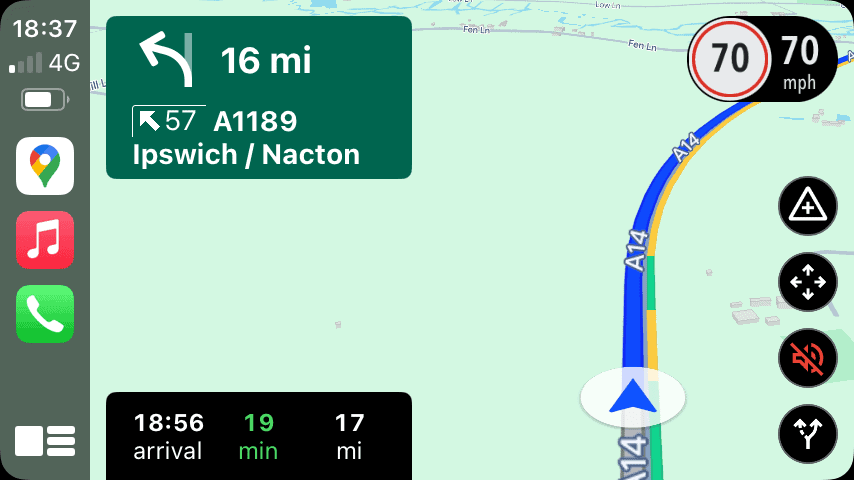
In an exciting update for CarPlay enthusiasts, Google Maps has introduced a much-anticipated feature: the speedometer. This addition aims to enhance the user experience, making it easier and safer for drivers to stay within speed limits. Let’s dive into the specifics of this new feature and its implications for CarPlay users.
The New Speedometer Feature
Google Maps has been a go-to navigation app for millions of users worldwide. With the introduction of the speedometer feature, the app is now tailored even more to the needs of drivers. Here’s what you need to know about this feature:
- Real-Time Speed Monitoring: The speedometer provides real-time updates of your speed as you drive.
- Enhanced Safety: By keeping an eye on your speed, Google Maps helps you avoid speeding tickets and ensures you adhere to speed limits for safer driving.
- Seamless Integration: The speedometer is integrated into the app interface, ensuring that it does not obstruct your view or cause distractions.
This new feature is particularly beneficial for those who frequently drive long distances or in unfamiliar territories where it’s easy to overlook speed limits.
Why This Update Matters
Many CarPlay users have been eagerly waiting for this update. Prior to this, the absence of an in-built speedometer on Google Maps was a notable downside when compared to other navigation apps. Here’s why the speedometer feature is a game-changer:
- Improved User Experience: The speedometer enhances the overall usability of Google Maps on CarPlay.
- Additional Layer of Safety: Drivers can rely on a single app for navigation and speed monitoring, minimising the need for additional devices or apps.
- Convenience: The speedometer eliminates the guesswork, allowing drivers to focus on the road rather than constantly checking their car’s speedometer.
How to Use the Speedometer
Using the speedometer feature in Google Maps on CarPlay is straightforward. Here are the steps to get started:
1. Ensure your Google Maps app is updated to the latest version.
2. Connect your smartphone to CarPlay.
3. Open Google Maps and start navigation as usual.
4. The speedometer will appear on the screen, displaying your current speed.
It’s that simple! This seamless integration guarantees that you can keep track of your speed without any effort.
Incident Reporting
Also in this update, is the ability to report Incidents while driving. Again, something Apple Maps and Waze have had for some time, you can now report a range of incidents or events on the map quickly and easily.
The icon is available on the screen both during navigation, and just on the general map view.
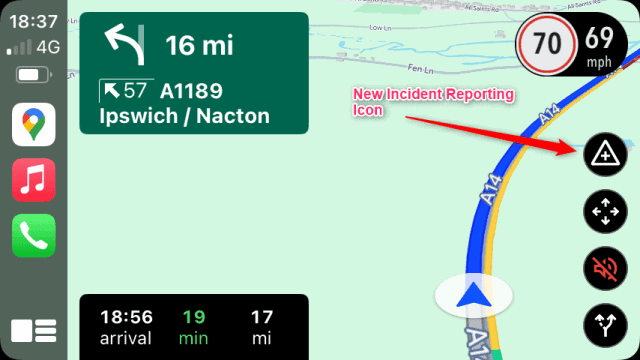
When clicked you can see the range of events you can report to Google.

This data is then fed into Google and made available to other Google Maps users when they pass through that area. Exactly how long an incident is shown for e.g. mobile speed camera indication is unknown.
Comparison with Other Navigation Apps
While the speedometer and incident reporting feature is a significant update for Google Maps, it’s essential to consider how it stacks up against other navigation apps. Apps like Waze and Apple Maps have had speedometers for a while. Here’s a quick comparison:
- Waze: Known for its community-driven alerts, Waze has had a speedometer feature for years. However, Google Maps now offers a comparable experience with its extensive map data and reliability.
- Apple Maps: Apple’s in-house navigation app also includes a speedometer, alongside other CarPlay optimisations. However, Google Maps is often preferred for its comprehensive mapping and traffic updates.
With the addition of the speedometer, Google Maps has levelled the playing field, giving users more reasons to stick with their favourite navigation app.
Feedback from the Community
The response from the CarPlay community has been overwhelmingly positive. Users have taken to social media platforms and forums to express their satisfaction with the new feature. Some highlights include:
- Enhanced Safety: Users appreciate the added safety measure, stating it makes driving less stressful and more secure.
- Ease of Use: The intuitive integration of the speedometer into the Google Maps interface has been lauded for its ease of use.
- No More App Switching: Many users are pleased that they no longer need to switch between apps to monitor speed, or report an incident, making for a smoother driving experience.
These reactions underline the necessity of the speedometer feature and highlight how it improves day-to-day driving experiences.
Future Updates and Improvements
Google is continually working to improve its services, and future updates are likely to bring even more enhancements to Google Maps on CarPlay. While the speedometer is a significant addition, users can look forward to:
- Improved Real-Time Data: Future updates may include more real-time data integrations, such as more accurate speed limit changes and road conditions.
- Expanded Features: There’s potential for additional features like eco-driving tips and further safety alerts.
These improvements will continue to make Google Maps an indispensable tool for drivers.
Conclusion
The addition of the speedometer and incident reporting feature to Google Maps on CarPlay is a long awaited milestone. It addresses a long-standing need that Apple Maps has had for a while, and shows Google’s commitment to enhancing user experience and safety. As this feature becomes more widely adopted, CarPlay users can enjoy a more convenient and secure navigation experience.

This post was written by Rob Gordon, an IT geek, gadget lover and blogger. Rob has been using the internets since 1994 when the only streaming video was that coffee pot in Cambridge (rip)….
Follow Rob on X – @robgordon – about.me/robgordonuk