
Data loss may come as a surprise to anyone. In any case, whether you delete crucial files, format your drive, or run into corrupted partitions, it may be annoying to lose essential data. Nevertheless, there is specialized software that helps restore deleted files from various storage media including hard drives, SSDs, USB flash drives, SD cards, and external drives.
One of the best-known brands among the variety of data recovery tools is Stellar Data Recovery Professional. The software offers restoring lost documents, images, videos, emails, and other types of data, and in addition, it provides such additional options as partition recovery, BitLocker recovery, and RAW drive recovery.
Quick Verdict
| Rating Category | Score |
| Ease of Use | ⭐⭐⭐⭐⭐ |
| Recovery Performance | ⭐⭐⭐⭐⭐ |
| Features | ⭐⭐⭐⭐⭐ |
| Scan Speed | ⭐⭐⭐⭐☆ |
| Value for Money | ⭐⭐⭐⭐☆ |
| Overall Rating | 4.7/5 |
What Is Stellar Data Recovery Professional?
Stellar Data Recovery Professional is an advanced version of data recovery software which can help the user in recovering their lost, deleted or formatted data from different storage media. It is more powerful than simple data recovery software because it deals with complicated data loss issues such as corrupt partitions and drives.
The software supports recovery from:
- Internal HDDs
- SSDs
- USB flash drives
- SD and microSD cards
- External hard drives
- Memory cards
- BitLocker-encrypted drives
It can recover data lost due to:
- Accidental deletion
- Formatting
- Virus attacks
- Corrupted file systems
- Lost partitions
- RAW drives
- System crashes
The biggest strength of Stellar Data Recovery Professional is its clear, wizard-driven user interface. No technical knowledge is needed to use the software even for the first time.
Key Features
Stellar Data Recovery Professional is a powerful software package with an array of tools that surpass the capabilities of file recovery.
1. Recover Deleted and Formatted Files
This data recovery professional software is capable of recovering those files that have been deleted either from the Recycle Bin, via keyboard shortcut key, or from the hard disk after formatting.
It supports hundreds of file formats, including:
- Documents
- Photos
- Videos
- Audio files
- Emails
- PDF files
- ZIP archives
2. BitLocker Drive Recovery
One of the most notable features of the Professional version is its compatibility with BitLocker encrypted partitions.
In case of corruption, failure, or formatting of a BitLocker drive, Stellar Data Recovery will be able to scan and recover files once the drive is unlocked by means of a password or recovery key.
It is highly useful for business-oriented clients who use Windows-based data encryption.
3. Lost Partition Recovery
In cases where a partition is lost due to deletion, corruption, or even formatting of the disk drive, Stellar scans and recovers the lost partition along with its contents.
It becomes useful in cases where the whole drive partition is lost, instead of deleting individual files.
4. RAW Drive Recovery
There are instances when Windows shows up a storage device as RAW rather than NTFS or FAT32. It is a sign of file system corruption.
Instead of forcing users to format the drive right away, Stellar checks out the RAW partition and tries to retrieve its data without formatting.
5. Quick Scan and Deep Scan
There are two scanning options offered by the software:
Quick Scan – Quick Scan will locate any recently deleted files.
Deep Scan – Deep Scan is an exhaustive search carried out on a sector-by-sector basis and is relatively effective for the recovery of files from a formatted drive or a physically damaged medium.
The Deep Scan, although time-consuming, manages to recover more files.
6. Preview Before Recovery
Stellar allows the user to preview any document and files before starting the process of recovery.
This ensures the integrity of the file that is being restored and also saves from unnecessary file restoration.
7. Create a Disk Image
This advanced function enables the creation of a complete copy of the entire hard drive.
Rather than scanning the hard drive itself over and over again, the users can restore files from the disk image, especially if the hard drive is faulty.
User Interface
The user interface is one of the best features of Stellar.mRather than confusing the users with recovery settings, it takes a step by step process. It is a simple process that involves the following steps:
- Choosing the file type.
- Choosing the storage device.
- Performing the scan.
- Previewing recoverable files.
- Recovering the chosen files.
The user interface is clean, easy to use, and perfect for novices, yet you have an option of performing advanced scans if you are experienced. What distinguishes Stellar from many other recovery programs is that it is very easy to use.
Performance and Recovery Quality
Recovery performance is one of the most important factors when choosing data recovery software. During typical recovery scenarios, Stellar performs well when recovering:
- Deleted Office documents
- Photos
- Videos
- PDFs
- USB flash drive data
- SD card files
- External hard drive data
Deep Scan increases the chances of detecting deleted files on formatted drives and corrupted drives through scanning of all sectors of the storage media.
The scanning process is largely dependent on the size and state of the hard drive. It only takes a few minutes for a USB drive to complete scanning process while it might take longer for a multi-terabyte hard drive.
Preview feature is especially helpful since it provides an opportunity of previewing the files that are to be restored before restoring them.
Supported Devices and File Systems
Stellar Data Recovery Professional is supported by many types of storage drives, which makes it useful for personal as well as professional data recovery purposes.
Supported Storage Devices
- Internal Hard Disk Drives (HDDs)
- Solid-State Drives (SSDs)
- USB Flash Drives
- SD, SDHC, SDXC, and microSD Cards
- External Hard Drives and SSDs
- Memory Cards
- BitLocker-Encrypted Drives
The program can retrieve data from storage media that have been accidentally formatted, corrupted, inaccessible, or have been marked RAW.
Supported File Systems
Stellar supports the most commonly used Windows file systems, including:
- NTFS
- FAT16
- FAT32
- exFAT
This wide range of compatibility enables the software to retrieve information from laptops, desktop computers, portable storage media, and external hard disks.
How to Recover Data Using Stellar Data Recovery Professional
Data recovery through the Stellar Data Recovery Professional Software is very easy and does not demand much technical knowledge.
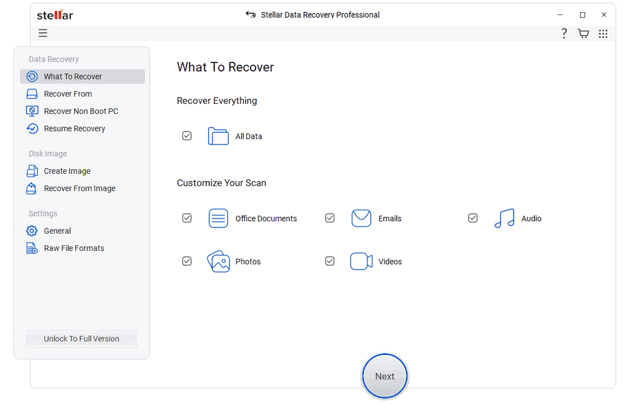
Step 1: Select What to Recover
Start the software and pick the types of files that you wish to recover. This could be all or some categories such as Documents, Photos, Videos, Emails, or Audio files.
Step 2: Choose the Storage Device
Select the disk from which the files are lost. It could be either your internal disk, USB flash disk, SD Card, SSD, or any external hard disk.

Step 3: Scan the Drive
First, run a Quick Scan. In case you don’t find your files, you should start a Deep Scan, as this method will look for your files more extensively.
Step 4: Preview Recoverable Files
After that, preview the list of files that can be recovered to make sure that they are not corrupt.

Step 5: Recover Your Data
Then select the files you wish to recover and save them on another disk.
Pros and Cons
Pros
- Simple and intuitive interface
- Supports HDDs, SSDs, USB drives, SD cards, and external storage
- BitLocker-encrypted drive recovery
- Lost partition recovery
- RAW drive recovery
- Quick Scan and Deep Scan
- Preview files before recovery
- Disk image creation for safer recovery
- Supports hundreds of file formats
- Suitable for beginners and professionals
Cons
- Deep Scan can take considerable time on large drives.
- Some advanced features are only available in higher editions.
- Recovery success depends on the condition of the storage device and whether the deleted data has been overwritten.
Final Verdict
Stellar Data Recovery Professional is an all-round data recovery program that is user-friendly yet powerful in terms of its ability to recover data. No matter whether you want to recover deleted files, restore your data from a reformatted USB device, or extract data from a BitLocker encrypted partition, you will get a variety of utilities in this software that will help you handle any data loss situation.
The easy-to-use interface will make it perfect for a beginner while such additional features as BitLocker recovery, lost partition recovery, RAW drive recovery, Deep Scan, and disk imaging will be appreciated by professional users.
Although there is no data recovery software in the world that could guarantee 100% data recovery in all situations, Stellar Data Recovery Professional will provide you with a reliable combination of these three aspects.

I love tech and gaming, and am always looking for the ‘next big thing’…